Context
This template provides configurable R/Quarto code for creating fish biomass report card visualizations from MERMAID fishbelt data. It is designed to work with any MERMAID project — just change the project name and threshold values in the configuration section at the top of the document. The visualizations were co-developed with WCS Solomon Islands and are based on ideas from the MERMAID Explore dashboard and from the Madagascar report card.
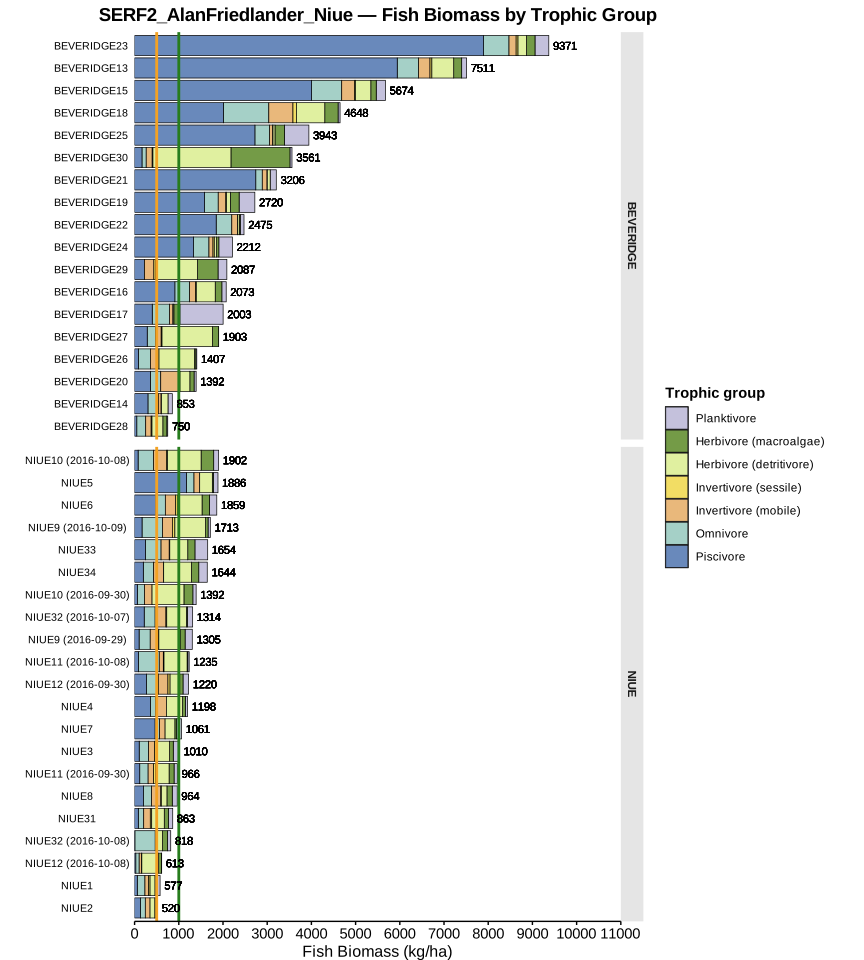
The report includes a fish biomass histogram color-coded by stoplight thresholds and a stacked horizontal bar plot showing biomass by trophic group at each site. There is also an optional section for visualizing biomass by fish family, which can be customized to highlight families of particular interest in your region (e.g. food fish).
Fish biomass by trophic group
The main visualization in the report card is a horizontal stacked bar plot showing fish biomass at each site, broken down by trophic group. Horizontal lines mark the configurable stoplight thresholds (default: 500 and 1,000 kg/ha), making it easy to see which sites fall below, between, or above the thresholds.
Sites can optionally be grouped by a common name prefix (e.g. community name) and displayed as facets.
Customization
The report is designed to be adapted without editing any code beyond the configuration section. The settings you can change include:
Project name — set this to match your MERMAID project and the code will search for and download the corresponding data.
Stoplight thresholds — the yellow and green biomass boundaries (in kg/ha) used to color-code the histogram and draw threshold lines on the bar plot.
Site grouping — optionally group sites by a common name prefix (e.g. community), with support for custom ordering and merging of groups.
Target fish families — for the optional fish family plot, define which families are of interest in your region. A Solomon Islands example list is provided as a starting point.
See the full resource for detailed configuration instructions and the complete code.